
logo

User Management-Control with Clarity

Manage users, roles, and permissions with secure and structured access control.
Downloadthe product deck.
User Management-Control with Clarity
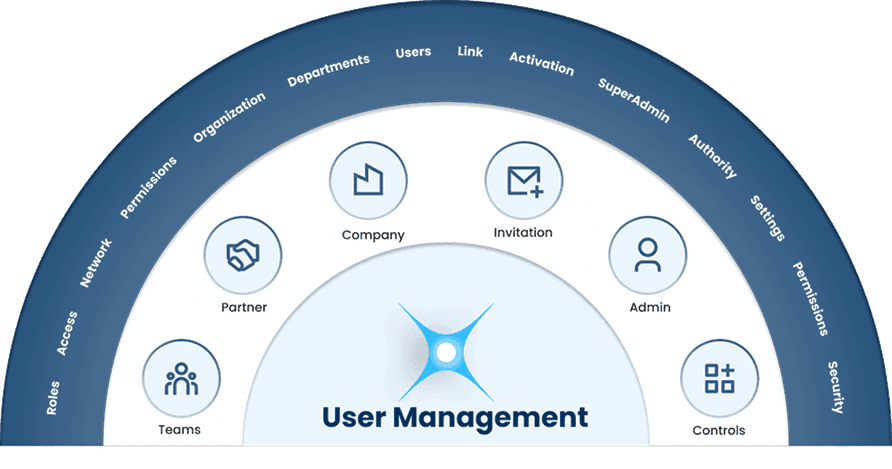
Core Features of User Management
Teams
TeamsCollaborate and manage your team
Manage your team in one place. Assign roles, track activities, and keep everyone aligned to achieve goals efficiently
Partner
PartnerTrack partner performance easily
Bring your partner network into a unified view. Track opportunities, performance, and progress across all partners.
Company
CompanyExtend your Salesforce
Manage all company accounts in one place. Access key details, track associated contacts, and monitor business relationships easily.
Invitation
InvitationInvite users to join your workspace
Send and manage invitations from one place. Add team members, partners, or collaborators and start working together quickly.
Admin
AdminConfigure system and user controls
Control your workspace from a centralized admin panel. Manage users, roles, permissions, and key system settings.
Controls
ControlsControl access and platform behavior
Manage system settings, permissions, and configurations in one place. Customize how your platform operates and maintains control.

Key Benefits:

  • Teams: Keep your team aligned and working together efficiently.

  • Partner: Manage and monitor partner networks from one place.

  • Company: Maintain a complete view of all business accounts.

  • Invitation: Quickly onboard users and collaborators to your workspace.

  • Admin: Centrally manage users, roles, and system settings.

  • Controls: Maintain full control over access and platform behavior.

Key Benefits:

How It Works:

Interactive dashboards and reports provide a clear view of conversion trends, win/loss reasons, and partner performance.

  • Teams: Organize users into teams, assign roles, and track activities collaboratively.

  • Partner: Track partner opportunities, performance, and engagement in a unified system.

  • Company: Connect company accounts with contacts, deals, and interactions.

  • Invitation: Send secure invitations to users and manage onboarding from one dashboard.

  • Admin: Use a centralized admin panel to configure users, permissions, and settings.

  • Controls: Set system configurations, access levels, and operational rules.

How It Works:

Why It Matters:

  • Teams: Improves collaboration and keeps everyone aligned toward shared goals.

  • Partner: Strengthens partner relationships and ensures better performance tracking.

  • Company: Provides full visibility into organizational relationships and accounts.

  • Invitation: Reduces onboarding friction and helps teams start collaborating faster.

  • Admin: Ensures secure and organized user management across the platform.

  • Controls: Protects data, maintains governance, and ensures smooth system operations.

Why It Matters:

Frequently Asked Question

Polluxa user management CRM software to simplify your business needs allows organizations to manage users, roles and permissions within a CRM system. It ensures that the right people have the correct access to data, tools, and features based on their responsibilities.
The Teams feature allows organizations to organize users into groups, assign roles, and track team activities. This helps improve collaboration and keeps teams aligned with business goals with the help of user management CRM software to simplify your business needs..
The Partner feature helps businesses manage and track their partner network. It allows organizations to monitor partner performance, track opportunities, and maintain strong partner relationships.
The Company feature user management CRM software to simplify your business needs that allows businesses to manage company accounts in one place. It connects companies with contacts, deals, and interactions, providing a complete overview of business relationships.
The Invitation feature allows administrators to invite new users, partners or collaborators to the platform. Invitations can be sent directly from the system, making it easy to onboard team members quickly using user management CRM software to simplify your business needs.
The Admin panel provides centralized control over users, roles, permissions, and system settings. Administrators can manage user access and configure platform settings from a single dashboard.
System controls allow organizations to manage permissions, security settings, and platform configurations. These controls help maintain data security, governance, and operational stability.
Yes. This platform user management CRM software to simplify your business needs, supports role-based access control, allowing businesses to define different permission levels for users based on their roles and responsibilities.
User Management CRM software to simplify your business needs ensures that only authorized users can access sensitive information. By controlling permissions and access levels, organizations can protect their data and maintain system security.
You can start by accessing the admin panel, inviting users, assigning roles, and configuring permissions to match your organization’s structure and workflow with our software called User Management CRM software to simplify your business needs.