
logo

Helpdesk – Smart Support, Seamless Experience

Manage tickets, requests, and issues with fast and structured support workflows.
Downloadthe product deck.
Helpdesk – Smart Support, Seamless Experience
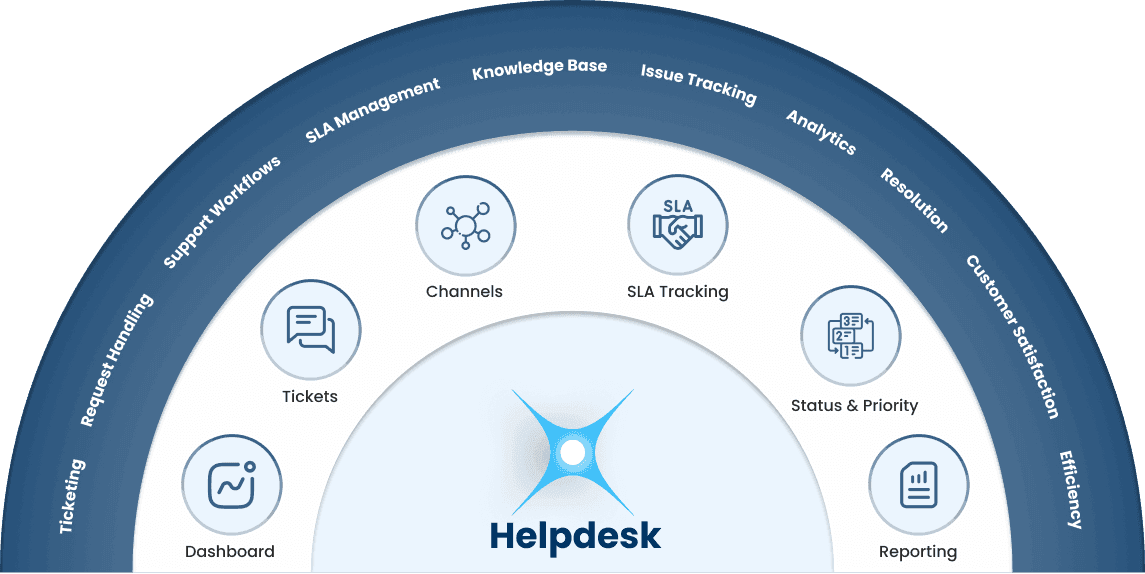
Core Features of Helpdesk
Dashboard
DashboardAll support insights in one place
Gain real-time insights at a glance Monitor your support health with high-level metrics. Track total tickets, open cases, and average response times to ensure your team stays on top of every customer inquiry.
Tickets
TicketsStay on top of every ticket
Browse, search, and manage support cases A centralized hub for all incoming requests. Filter by status, priority, or customer to organize your workflow and ensure no ticket falls through the cracks.
Channels
ChannelsBring every channel into one place
Unify support across every touchpoint Whether a request comes through the Portal, email, or chat, manage it all in one place. Keep communication consistent regardless of how the customer reaches out.
SLA Tracking
SLA TrackingStay on top of SLA commitments
Monitor response and resolution speed Keep an eye on critical performance indicators like Average First Response and Average Resolution time. Ensure your team meets service-level agreements and maintains high satisfaction.
Status & Priority
Status & PriorityTrack status and prioritize efficiently
Organize tasks by urgency and progress Assign priorities from "Low" to "Urgent" and track tickets through their lifecycle—from "Pending" to "Resolved"—so the most critical issues get addressed first.
Reporting
ReportingTurn data into actionable insights
Analyze and export performance data Generate reports on ticket trends and team efficiency. Use the export tool to take your data offline for deeper analysis or executive presentations.


Key Benefits:

  • Dashboard: Instant visibility into team workload and performance.

  • Tickets: A structured environment to manage high volumes of inquiries.

  • Channels: Seamlessly track where your customers are contacting you from.

  • SLA Tracking: Guarantees timely support and improves customer trust.

  • Status & Priority: Prevents bottlenecks by highlighting urgent tasks.

  • Reporting: Provides data-driven insights to improve support operations

Key Benefits:

How It Works:

  • Dashboard: Aggregates live data into visual tiles like "Open Tickets" and "Avg Resolution."

  • Tickets: Displays a searchable table with key details like Ticket ID, Subject, and Created Date.

  • Channels: Automatically tags tickets based on their source (e.g., Portal, Email, Web).

  • SLA Tracking: Calculates the time elapsed from ticket creation to the first agent response.

  • Status & Priority: Allows agents to update the "Pending" or "Closed" status as they work.

  • Reporting: Uses the "Export" feature to pull CSV or Excel files of all ticket activity.
How It Works:

Why It Matters:

  • Dashboard: Helps managers allocate resources where they are needed most.

  • Tickets: Keeps the support team organized and prevents duplicate work.

  • Channels: Ensures a true "omnichannel" experience for your customers.

  • SLA Tracking: Directly correlates to higher Customer Satisfaction (CSAT) scores.

  • Status & Priority: Streamlines the workflow so agents focus on high-impact issues.

  • Reporting: Identifies recurring problems to help improve product or service quality.
Why It Matters:

Frequently Asked Question

The Dashboard gives you real-time insights into your team's workload and performance. You can monitor response time, resolution speed, total tickets, open cases, average response times, and other critical performance indicators like Average First Response and Average Resolution Time.
The Dashboard helps managers allocate resources where they are needed most by aggregating live data into visual tiles like "Open Tickets" and "Avg Resolution" — giving a clear picture of team health at a glance.
Tickets lets you browse, search, and manage support requests from a centralized hub. You can filter by status, priority, or customer to organize your workflow and ensure no ticket falls through the cracks.
The ticket list displays a searchable table with key details like Ticket ID, Subject, Assigned Agent, and Created Date — keeping the support team organized and preventing duplicate work.
Helpdesk supports all major communication channels — Portal, Email, Chat, and WhatsApp. It automatically tags tickets based on their source so your team always knows how a customer reached out.
Multi-channel support ensures a true omnichannel experience for your customers — no matter how they contact you, the conversation is tracked and managed in one place consistently.
SLA (Service Level Agreement) Tracking calculates the time elapsed from ticket creation to the first agent response. It guarantees timely support, improves customer trust, and directly correlates to higher Customer Satisfaction (CSAT) scores.
Agents can update tickets from "Pending" to "Closed" as they work. Priority labels help identify urgent tickets quickly, preventing bottlenecks and ensuring high-impact issues are addressed first.
Prioritization streamlines the workflow so agents focus on high-impact issues, reducing resolution time and improving overall service quality.
You can analyze and export performance data on ticket trends and team efficiency. The export tool lets you pull CSV or Excel files of all ticket activity for deeper analysis or executive presentations.
Reporting identifies recurring problems to help improve product or service quality. By turning data into actionable insights, teams can proactively address issues before they affect more customers.